
JMSL Chart Programmer's Guide


|
|
JMSL Chart Programmer's Guide
|
2D Drawing Elements >> AxisXY |
|
AxisXY
The AxisXY node is the basis of many chart types, including scatter, line, area and
error bar. Its parent node must be the root Chart node.
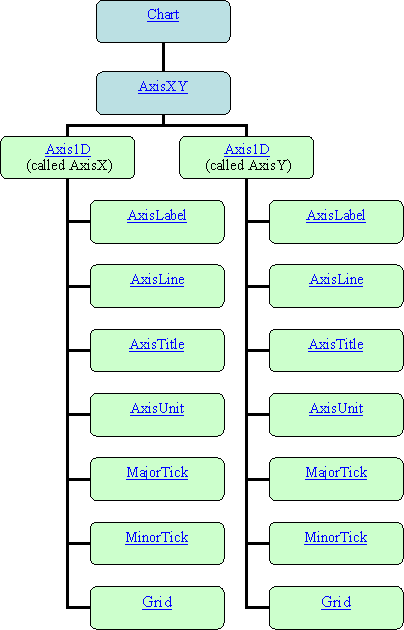
When an AxisXY node is created, it creates two Axis1D nodes. They can be
obtained by using the methods AxisXY.getAxisX() and AxisXY.getAxisY()
. Each of the Axis1D nodes in turn creates additional child nodes, as seen
in the diagram below.
Accessor methods can be chained together, so the x-axis line can be retrieved using
axis.getAxisX().getAxisLine()
The code to set the x-axis line to blue is
axis.getAxisX().getAxisLine().setLineColor(Color.blue)
Axis Layout
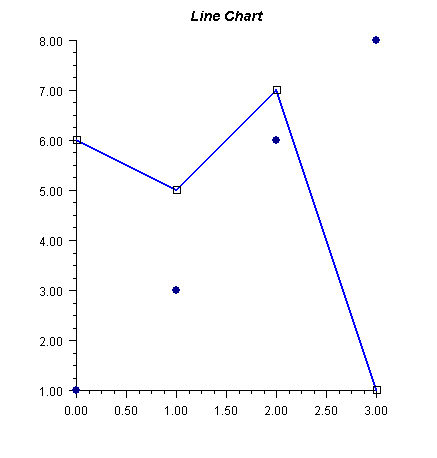
The layout of an AxisXY chart, such as the one below, is controlled by the
attributes Window, Density, and Number.
Window
Window is a double-array-valued attribute that contains the axis limits. Its value is
{min, max}. For the above chart, the value of the Window attribute for the x-axis
is [0, 3] and for the y-axis it is [1, 8].
Number
Number is an integer-valued attribute that contains the number of major tick
marks along an axis. In an Axis1D node its default value is 5, which is also the
value in the above example.
Density
Density is the number of minor tick marks per major tick mark. Its default value
is 4, which is also the value in the example.
Transform
The x- and y-axes may be linear, logarithmic, or customized, as specified by the Transform attribute. This attribute can have the values:
TRANSFORM_LINEAR indicating a linear axis. This is the default.
TRANSFORM_LOG indicating a logarithmic axis
TRANSFORM_CUSTOM indicating a custom transformation. The transformation
specified by the CustomTransform attribute is used.
CustomTransform
A customized transformation is used when the Transform attribute has the value
TRANSFORM_CUSTOM. A custom transform is an object implementing the
Transform interface. It defines a mapping from the interval specified by the
Window attribute to and from the interval [0,1]. See Custom Transform for
more information.
The class TransformDate implements the Transform interface. It maps from
a regular calendar to one without weekends, which is useful for charting stock
prices that are defined only on weekdays.
Autoscale
Autoscaling is used to automatically determine the attribute Window (the range of
numbers along an axis) and the attribute Number (the number of major tick
marks). The goal is to adjust the attributes so that the data fits on the axes and the
axes have "nice" numbers as labels.
Autoscaling is done in two phases. In the first ("input") phase the actual range is determined. In the second ("output") phase chart attributes are updated.
Attribute AutoscaleInput
The action of the input phase is controlled by the value of attribute
AUTOSCALE_INPUT in the axis node. It can have one of three values.
AUTOSCALE_OFF turns off autoscaling.
AUTOSCALE_DATA scans the values in the Data nodes that are attached to the
axis to determine the data range. This is the default value.
AUTOSCALE_WINDOW uses the value of the Window attribute to determine
the data range.
Attribute AutoscaleOutput
The value of the AUTOSCALE_OUTPUT attribute can be the bitwise combination
of the following values.
AUTOSCALE_OFF no attributes updated.
AUTOSCALE_NUMBER updates the value of the Number attribute. This is the
number of major tick marks along the axis.
AUTOSCALE_WINDOW updates the value of the Window attribute. This is the
range of numbers displayed along the axis.
The default is AUTOSCALE_NUMBER |AUTOSCALE_WINDOW; both the
attributes Number and Window are adjusted.
| © Visual Numerics, Inc. All rights reserved. |
|