
IMSL C# Programmer’s Guide


|
|
IMSL C# Programmer’s Guide
|
2D Drawing Elements >> Fill Area Attributes |
|
Fill Area Attributes
FillOutlineType
FillOutlineType is an integer-value attribute that turns on or off the drawing of
an outline around filled areas. Its value should be FILL_TYPE_NONE (for outline
off) or FILL_TYPE_SOLID (for outline on). The default is to draw solid lines.
FillOutlineColor
FillOutlineColor is a Color-valued attribute that determines the color used to
outline the filled regions. The outline is drawn only if the attribute FillOutlineType
has the value FILL_TYPE_SOLID. Its default value is Color.Black.
FillType
FillType is an integer-value attribute that turns on or off the drawing of the interior
of filled areas. Its value should be
FILL_TYPE_NONE for fill off.
FILL_TYPE_SOLID for fill by a single, solid color. This is the default.
FILL_TYPE_GRADIENT for fill by a color gradient.
FILL_TYPE_PAINT for fill by a Brush object. This is usually a texture.
FillColor
FillColor is a Color-valued attribute that determines the color used to fill a
region with a solid color. Its default value is Color.Black.
Gradient
Gradient is a Color array-valued attribute that fills a region with a gradient
color. It does not have a default value.
The value of Gradient should be an array of four colors. These are the colors at
the four corners of a square. In order they are: lower-left, lower-right, upper-right
and upper-left.
If none of the above patterns exist, then no gradient is drawn.
| Vertical |  | SetGradient(Color.Yellow, Color.Yellow, Color.Red, Color.Red) |
| Horizontal | 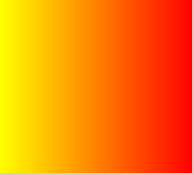 | SetGradient(Color.Yellow, ColorRed, Color.Red, Color.Yellow) |
| Diagonal |  | SetGradient(Color.Yellow, null, Color.Red, null) |
| Diagonal |  | SetGradient(null, Color.Yellow, null, Color.Red) |
FillPaint
FillPaint is a Brush-valued attribute that fills a region with a tiled pattern. It
does not have a default value. The class FillPaint contains utilities to define
some useful paint patterns.
Some Examples of FillPaint
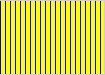 | FillPaint.VerticalStripe(10, 5, Color.Yellow,Color.Blue) |
 | FillPaint.HorizontalStripe(10, 5, Color.Yellow,Color.Blue) |
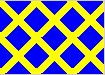 | FillPaint.Diamond(36, 5, Color.Blue,Color.Yellow) |
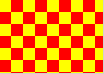 | FillPaint.Checkerboard(24, Color.Red,Color.Yellow) |
The FillPaint attribute can also be set using an Image, which is used to tile filled
regions
| © Visual Numerics, Inc. All rights reserved. |
|