
IMSL C# Programmer’s Guide


|
|
IMSL C# Programmer’s Guide
|
Charting 2D Types >> Scatter Plot |
|
Scatter Plot
This section describes the construction of scatter charts. The markers can be formatted using the Marker Attributes.
It is also possible to mix lines and markers (see Mixed Line and Marker Plot).
Simple Scatter Plot
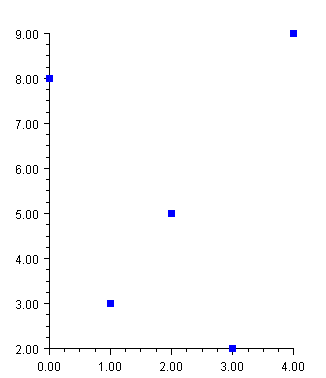
The FrameChart class is used to create a frame containing a Chart node. The
Chart node is the root of the tree to which an AxisXY node is added. A Data
node is then created as the child of the axis node. The Data node is created using
an array of y-values. The x-values default to 0, 1, ....
The DataType attribute is set to DATA_TYPE_MARKER to make this a scatter
plot.
The look of the markers is controlled by the marker attributes. In this example the
MarkerType attribute is set to MARKER_TYPE_FILLED_SQUARE. The
MarkerColor attribute is set to blue (to view plot in color see online
documentation).
using Imsl.Chart2D;
using System.Drawing;

public class SampleSimpleScatter : FrameChart {

    public SampleSimpleScatter() {
        Chart chart = this.Chart;
        AxisXY axis = new AxisXY(chart);

        double[] y = new double[] {8, 3, 5, 2, 9};
        Data data1 = new Data(axis, y);
        data1.DataType = Data.DATA_TYPE_MARKER;
        data1.MarkerType = Data.MARKER_TYPE_FILLED_SQUARE;
        data1.MarkerColor = Color.Blue;
    }

    public static void Main(string[] argv) {
        System.Windows.Forms.Application.Run(new SampleSimpleScatter());
    }
}
Complex Scatter Plot
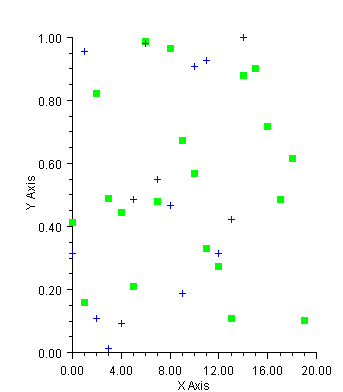
This example shows a scatter plot with two data sets. The Data nodes are created
using random y-values generated by Random. The x-values default to 0, 1, ....
The axes are labeled by setting the AxisTitle attribute for the x and y axes.
The DataType attribute is set in the axis node. The axis node does not itself use
this attribute, but from there it is inherited by the child Data nodes.
(Download Code)
using Imsl.Chart2D;
using System.Drawing;
using Imsl.Stat;

public class SampleScatter : FrameChart {

    public SampleScatter() {
        Random r = new Random(123457);

        Chart chart = this.Chart;
        AxisXY axis = new AxisXY(chart);
        axis.AxisX.AxisTitle.SetTitle(“X Axis”);
        axis.AxisY.AxisTitle.SetTitle(“Y Axis”);
        axis.DataType = Data.DATA_TYPE_MARKER;

        // Data set 1
        double[] y1 = new double[20];
        for (int k = 0;  k < y1.Length;  k++)  y1[k] = r.NextDouble();
        Data data1 = new Data(axis, y1);
        data1.MarkerType = Data.MARKER_TYPE_FILLED_SQUARE;
        data1.MarkerColor = Color.Green;

        // Data set 2
        double[] y2 = new double[20];
        for (int k = 0;  k < y2.Length;  k++)  y2[k] = r.NextDouble();
        Data data2 = new Data(axis, y2);
        data2.MarkerType = Data.MARKER_TYPE_PLUS;
        data2.MarkerColor = Color.Blue;
    }

    public static void Main(string[] argv) {
        System.Windows.Forms.Application.Run(new SampleScatter());
    }
}
| © Visual Numerics, Inc. All rights reserved. |
|