
IMSL C# Programmer’s Guide


|
|
IMSL C# Programmer’s Guide
|
Charting 2D Types >> Area Plot |
|
Area Plot
Area plots are similar to line plots, but with the area between the line and a reference
line filled in. An area plot is created if the DATA_TYPE_FILL bit is on in the
value of the DataType attribute. The default reference line is y=0. The location
of the reference line can be changed from 0 by setting the Reference property.
The Fill Area Attributes determine how the area is filled.
Simple Area Plot
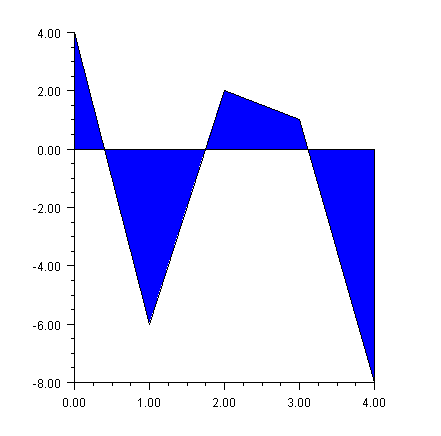
This example draws a simple area plot. The default value of the FillType
attribute is FILL_TYPE_SOLID. The example sets the FillColor attribute to
blue. So the area between the line and y=0 is solid blue.
(Download Code)
using Imsl.Chart2D;
using System.Drawing;

public class SampleArea : FrameChart {

    public SampleArea() {
        Chart chart = this.Chart;
        AxisXY axis = new AxisXY(chart);

        double[] y = new double[] {4, -6, 2, 1, -8};
        Data data1 = new Data(axis, y);
        data1.DataType = Data.DATA_TYPE_FILL;
        data1.FillColor = Color.Blue;
    }

    public static void Main(string[] argv) {
        System.Windows.Forms.Application.Run(new SampleArea());
    }
}
Painted Area Example
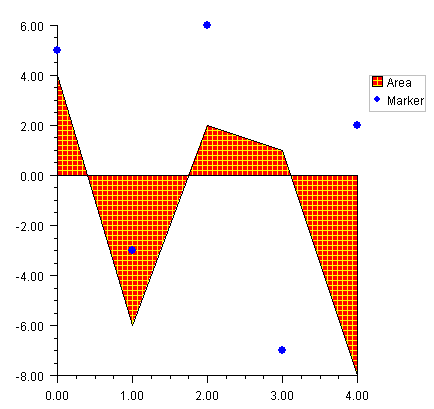
This example shows an area chart filled in with a painted texture. The texture is created
by a static method FillPaint.Crosshatch.
A second data set is plotted as a set of markers.
The Legend node is painted in this example and has entries for both the filled area
data set and the marker data set.
(Download Code)
using Imsl.Chart2D;
using System.Drawing;

public class SampleAreaPaint : FrameChart {

    public SampleAreaPaint() {
        Chart chart = this.Chart;
        AxisXY axis = new AxisXY(chart);
        chart.Legend.IsVisible = true;

        double[] y = new double[] {4, -6, 2, 1, -8};
        Data data1 = new Data(axis, y);
        data1.SetTitle(“Area”);
        data1.DataType = Data.DATA_TYPE_FILL;
        data1.FillType = Data.FILL_TYPE_PAINT;
        data1.SetFillPaint(FillPaint.Crosshatch(
	 	 	 10, 5, Color.Red, Color.Yellow));

        double[] y2 = {5, -3, 6, -7, 2};
        Data data2 = new Data(axis, y2);
        data2.SetTitle(“Marker”);
        data2.DataType = Data.DATA_TYPE_MARKER;
        data2.MarkerColor = Color.Blue;
        data2.MarkerType = Data.MARKER_TYPE_FILLED_CIRCLE;
    }

    public static void Main(string[] argv) {
        System.Windows.Forms.Application.Run(new SampleAreaPaint());
    }
}
Attribute Reference
The attribute Reference defines the reference line. If its value is a, then the reference
line is y = a. Its default value is 0.
| © Visual Numerics, Inc. All rights reserved. |
|